 Asta Sand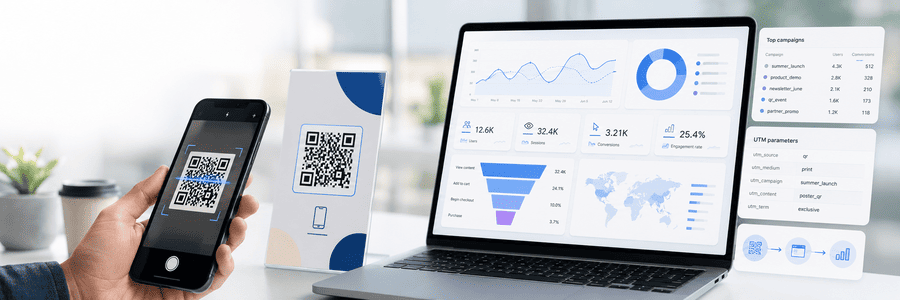
To track a QR code in Google Analytics 4, add UTM parameters to its destination URL before generating the code. Use a separate tagged URL for each physical placement, then compare sessions, engagement, and conversions in GA4. Add QR scan analytics when you also need redirect-level request data.
A reliable setup needs:
- A mobile-friendly landing page with GA4 installed.
- A destination URL with consistent UTM parameters.
- A separate tagged URL for each placement you want to compare; an editable short link is optional.
- A test scan before the design goes to print.
What Google Analytics 4 Can Measure From a QR Code
GA4 does not detect the camera scan itself. It records activity after the scan opens a web page and the GA4 tag runs in the visitor's browser.
| Question | Best data source |
|---|---|
| Did the QR link receive a request? | QR scan or redirect analytics |
| Which campaign and placement sent the visit? | GA4 with UTM parameters |
| What did the visitor do on the website? | GA4 events and conversions |
| Did the visitor complete the intended action? | GA4 key events or your business system |
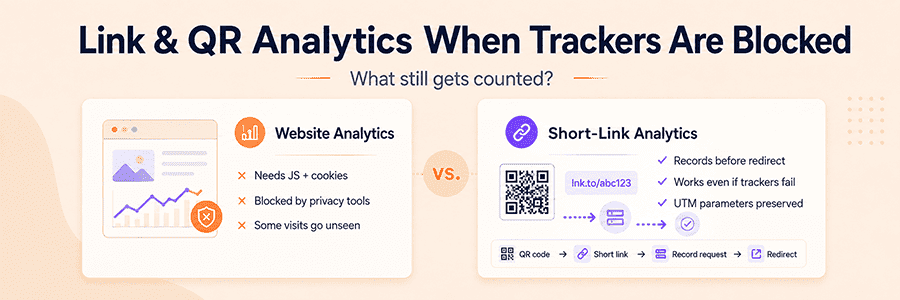
A redirect request may not become a GA4 session if the visitor closes the page early, loses the connection, declines analytics consent, or blocks the GA4 tag.
MeoVC provides QR scan tracking and click analytics for redirect-level activity. Use GA4 to analyze behavior after the landing page loads.
Choose a UTM Naming System Before Creating the QR Code
Google's manual-tagging documentation defines UTM parameters as URL fields that populate campaign and traffic-source dimensions in GA4.
For QR code campaigns, start with:
| Parameter | What it identifies | Example |
|---|---|---|
utm_source |
The physical source or placement type | poster |
utm_medium |
The delivery method | qr |
utm_campaign |
The marketing initiative | summer_sale |
utm_content |
The exact asset, version, or location | downtown_window_a |
utm_id |
An optional stable campaign ID | sum26 |
Use utm_source, utm_medium, and utm_campaign as the core set. Add utm_content when several QR codes belong to the same campaign and you need placement- or creative-level reporting.
A tagged URL can look like this:
https://example.com/sale?utm_source=poster&utm_medium=qr&utm_campaign=summer_sale&utm_content=downtown_window_a
Is ref a UTM parameter?
No. ref is a custom query parameter commonly used by websites for referral, affiliate, partner, or internal identifiers. It is not part of the standard UTM parameter set, and GA4 does not automatically map it to Session source, medium, campaign, or content.
Use ref only when your redirect system or landing page has a defined purpose for it:
https://example.com/sale?utm_source=poster&utm_medium=qr&utm_campaign=summer_sale&utm_content=downtown_window_a&ref=partner_42
Keep the UTM parameters for campaign attribution. If the ref value must also appear in GA4 reports, collect it as a custom event parameter and register the parameter as an event-scoped custom dimension. Do not use ref as a replacement for utm_source or utm_content.
Keep all parameter values lowercase, use one separator style, and document the naming rules. Values such as Summer_Sale, summer-sale, and summer_sale create separate report rows.
A custom medium such as qr may not fit a GA4 default channel group. Review Session source / medium and Session campaign instead of relying only on the Default channel group.
Never include names, email addresses, order numbers, or other sensitive data in UTM or ref values. Query parameters can appear in analytics systems, browser history, server logs, and screenshots.
How to Track QR Codes in GA4 Step by Step
1. Define the action you want to measure
Choose the business result the QR code should produce, such as:
- Submit a lead form.
- Redeem a coupon.
- Register for an event.
- Complete a purchase.
Make sure the landing page works well on mobile and that GA4 records the target action as an event or key event.
2. Create the tagged destination URL
Open the MeoVC UTM builder and enter the landing page URL, source, medium, campaign, and content values.
For a summer sale poster in a downtown store:
Landing page: https://example.com/sale
utm_source: poster
utm_medium: qr
utm_campaign: summer_sale
utm_content: downtown_window_a
The resulting URL is ready for GA4 attribution, but it may be too long for printed copy and can produce a denser QR pattern.
3. Put the tagged URL behind a short link
Create a short link that redirects to the full tagged destination URL. Put the short link in the QR code and confirm that the redirect preserves the complete query string.
This keeps the printed code separate from the final destination, provides redirect analytics, and allows the destination to be managed without reprinting the code. A branded custom domain can also make the printed fallback URL easier to recognize.
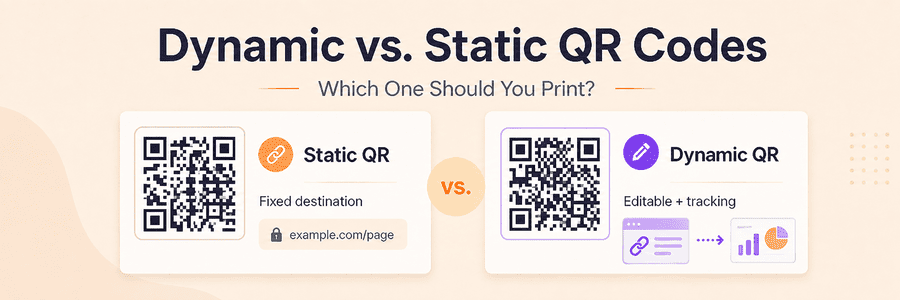
A static QR code containing the full tagged URL is acceptable when the destination will never change and redirect analytics are unnecessary.
4. Create one QR code for each placement you need to compare
Keep utm_campaign consistent across the campaign and change utm_content for each meaningful placement.
| Placement | utm_source |
utm_medium |
utm_campaign |
utm_content |
|---|---|---|---|---|
| Store window poster | poster |
qr |
summer_sale |
downtown_window_a |
| Checkout counter card | counter_card |
qr |
summer_sale |
downtown_checkout |
| Product box insert | packaging |
qr |
summer_sale |
box_insert_v2 |
| Trade show booth wall | trade_show |
qr |
summer_sale |
booth_wall_left |
Use one shared code only when a combined total is sufficient. Generate the final codes with the MeoVC QR code generator.
5. Test the complete redirect before printing
Test the QR code from the final artwork because size, contrast, surrounding graphics, material, and placement can affect scanning.
For the physical design checks, see the practical guide to QR code size and scan testing.
- Scan the code with at least two phones when possible.
- Confirm that it opens the correct landing page.
- Check that all UTM and optional
refparameters survive the redirect. - Test on a mobile connection, not only office Wi-Fi.
- Complete the target action.
- Confirm the visit and event in GA4 Realtime.
- Confirm the request in the MeoVC scan or link report.
Also test the short fallback URL printed near the code.
6. Find QR campaign traffic in GA4
Use GA4 Realtime for setup testing. For campaign analysis, open Reports → Acquisition → Traffic acquisition. An Editor or Administrator can customize that report to add missing dimensions or metrics; Google documents the report and its permissions.
- Session source / medium
- Session campaign
- Session manual ad content
- Session campaign ID, when
utm_idis used
Filter by a campaign such as summer_sale, then evaluate the metrics that match the goal: engaged sessions, key events, purchases, or form submissions.
Use session-scoped dimensions for campaign performance. First user dimensions describe the campaign that originally acquired the user, not necessarily the QR code that started the current visit.
Compare QR Scan Data With GA4 Data
Treat scan analytics and GA4 as stages in one measurement path, not as automatically matched records:
QR request -> redirect -> landing page load -> GA4 session -> conversion
The table below is a hypothetical example, not MeoVC campaign data. Every row must use the same date range, time zone, campaign and utm_content value, filtering rules, and selected key event.
| KPI | What it measures | Formula | Example |
|---|---|---|---|
| QR link requests | Requests recorded by the short link | Direct count | 1,000 |
| GA4 sessions | Visits where GA4 collected data | Direct count | 760 |
| Request-to-session ratio | Aggregated GA4 sessions compared with redirect requests | GA4 sessions / QR link requests × 100% |
76% |
| Sessions with the selected key event | Distinct sessions in which that key event occurred at least once | Direct count | 95 |
| Session key event rate | Share of sessions with the selected key event | Sessions with key event / GA4 sessions × 100% |
12.5% |
| Request-to-key-event-session ratio | Aggregated sessions with the key event compared with redirect requests | Sessions with key event / QR link requests × 100% |
9.5% |
The first and last ratios compare aggregate counters; they do not prove that a particular request produced a particular session or key event. A true request-level conversion rate requires matching and deduplication. GA4 defines Session key event rate as sessions with a key event divided by total sessions.
- Many requests, fewer sessions: check redirects, page speed, consent, GA4 installation, mobile usability, and lost query parameters.
- Healthy sessions, few conversions: review the offer, message match, page usability, and form.
- Sessions without campaign data: inspect the final URL and confirm that no redirect or script removes the UTM parameters before GA4 initializes.
Common QR Code Tracking Mistakes
- Inconsistent naming:
qr,QR, andqr_codecreate separate report rows. - UTM parameters on internal links: they can overwrite acquisition attribution.
- Measuring scans without outcomes: connect each campaign to a key event or business result.
- Printing without a physical test: a code that works on screen may fail after resizing, compression, or printing.
- Treating scans as unique people: repeat scans, previews, tests, and automated requests can increase counts.
- Using
refas a UTM substitute: keep it separate and collect it explicitly when reporting is required.
When GA4 Alone Is Enough
| Use GA4 with UTM parameters | Add MeoVC scan analytics and an editable short link |
|---|---|
| The campaign is short-lived | Printed materials will remain in circulation |
| The destination will not change | The destination may need to change |
| Website sessions and conversions are sufficient | Redirect requests must be compared with GA4 sessions |
| Placement-level redirect data is unnecessary | Several locations or designs need separate diagnostics |
Start Tracking Your QR Campaign
Create a trackable QR code in MeoVC with a short link, consistent UTM parameters, and redirect-level analytics.