 Asta Sand
A QR code is a square image made up of small modules. It can hold useful information: a website link, text, contact details, Wi-Fi credentials, a phone number, and much more.
QR stands for Quick Response. The idea is simple: someone points a smartphone camera at the code, the device recognizes the data, and suggests the right action, such as opening a website or connecting to Wi-Fi.
Try Our Free QR Code Generator
What can you put in a QR code?
The most common choice is a regular link:
https://example.com
But a QR code can hold more than a URL. You can add:
- plain text;
- a phone number;
- an SMS message;
- an email address;
- contact details;
- Wi-Fi credentials;
- geographic coordinates;
- an app link;
- payment details;
- social media links;
- data in a custom format for your application.
At heart, a QR code is a compact way to pass along a string of data.
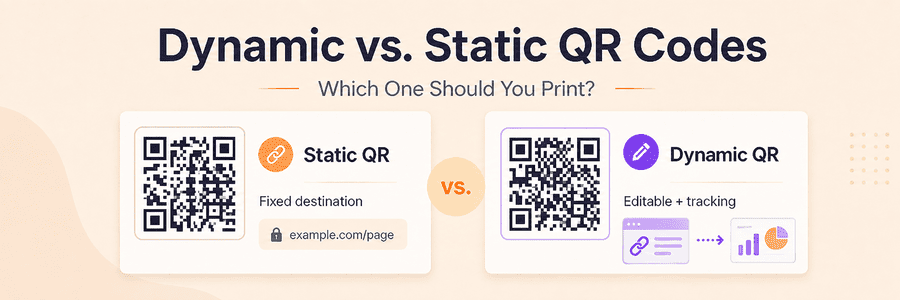
Static and dynamic QR codes
QR codes can broadly be divided into two types.
Static QR code
The information is stored directly in the code.
For example:
https://example.com/catalog
If the encoded address must change and the old address cannot remain active or redirect under your control, you will have to create and print a new QR code.
Advantages:
- simple;
- no additional service needed;
- works for as long as the encoded link or data remains valid.
Dynamic QR code
A dynamic QR code contains an intermediate link that redirects the user to the intended page.
For example:
https://go.yourbrand.com/a8F2k
The server decides where to send the user.
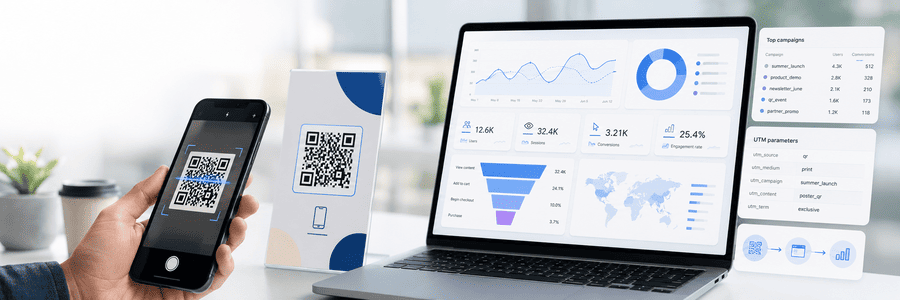
This lets you change the final destination without reprinting the QR code and count visits. The MeoVC platform can also track QR code scans.
See the practical comparison of static and dynamic QR codes for print before choosing a redirect.
QR code size and the amount of data
The more information you add, the more complex the QR code becomes.
A small QR code containing a link may look quite simple. Try cramming in several paragraphs of text, and it will need many more modules.
The rule is straightforward:
The shorter the data, the simpler the QR code and the easier it is to scan.
For links, avoid huge URLs with dozens of parameters. Use a short address or your own redirect instead.
Main QR code settings
When generating a QR code, you can usually adjust several settings.
Version
The version determines the size of the QR code grid.
The smallest option is Version 1, with a grid of 21 × 21 modules.
As the version increases, the grid gets larger. The largest standard option is Version 40, at 177 × 177 modules. DENSO WAVE publishes the version and capacity table, including the four-module increase per side.
You normally do not need to choose the version yourself. The library or generator selects it automatically based on the amount of data.
Size
A QR code is made up of logical elements called modules, not pixels.
The larger each module is when the code is generated, the larger the final image will be.
For print, generate the QR code at a comfortably high resolution or use a vector format such as SVG.
Space around the QR code
A QR code needs an empty area around it. This is called the quiet zone.
For a standard QR Code, keep this clear area at least four modules wide on every side, as specified in DENSO WAVE's code-area guidance.
Do not crowd a QR code against text, a border, or a photograph. Even a beautiful layout stops looking so clever when the camera says, “I have no idea what this is.”
Error correction levels
One of the most useful QR code features is error correction.
It allows a code to be recognized even if a small part is damaged, dirty, or covered.
There are four main levels:
| Level | Approximate share of total codewords that can be restored |
|---|---|
| L | about 7% |
| M | about 15% |
| Q | about 25% |
| H | about 30% |
These are restoration rates for total codewords, not a safe logo-area percentage. DENSO WAVE explains the unit and Reed-Solomon method in its error-correction documentation.
L — Low
The lowest level of correction.
The QR code is slightly simpler and can hold more data, but it does not cope well with damage.
M — Medium
A good all-purpose option for ordinary QR codes.
Q — Quartile
More resistant to damage.
This level works well when the QR code will appear on packaging, printed materials, or anywhere part of the image might get damaged.
MeoVC uses correction level Q by default because it offers a practical balance between code size and resistance to damage.
H — High
The highest level of correction.
Error correction does not guarantee that a code will scan after half of it is destroyed. It can restore data, but it has limits.
Can you put a logo in the center of a QR code?
Yes.
Placing a company logo in the middle is a popular technique that immediately makes a QR code feel more on-brand.
It works because of error correction.
For a QR code with a logo, Q or H provides more restoration capacity, but neither level guarantees that a particular overlay will scan.
Keep the logo small. Every covered module removes information the scanner may need.
Good practice:
- use a small logo;
- place it in the center;
- leave a little clear space around it;
- choose a high correction level;
- test the QR code with several phones.
Do not cover finder, timing, or alignment patterns. The three large corner markers are only the most visible functional elements.
A QR code does not have to be black and white
The classic design uses black modules on a white background.
But that is not a strict requirement.
You can use brand colors, gradients, and other combinations.
For example:
- a dark blue QR code on a white background;
- a black QR code on a pale yellow background;
- a dark green QR code on a cream background.
The main requirement is good contrast.
What to avoid
Bad ideas include:
- a light gray QR code on white;
- a yellow QR code on pale green;
- semi-transparent modules over a photograph;
- a very busy background;
- a background and modules with almost the same brightness.
The human eye may find a design like this attractive. A camera sees things less romantically.
If in doubt, make the modules noticeably darker than the background.
Can you change the shape of a QR code?
Yes. Modern QR code design has moved far beyond rigid black squares.
Modules can be:
- square;
- round;
- rounded;
- dots;
- diamonds;
- custom shapes.
You can also change the look of the three large corner markers by making them round, softening their corners, or styling them to match your brand.
The rule here is scanning first, beauty second.
If the styling prevents recognition, it is no longer a QR code. It is an abstract painting.
QR code backgrounds
The background does not have to be pure white.
You can use another light color or a carefully chosen image.
Photographs and complex textures need caution, though.
The reliable option is to place the QR code on a separate solid or nearly solid panel. This keeps the design intact without sacrificing scan quality.
Inverted QR codes
Some designs use light modules on a dark background.
Technically, an inverted QR code can work, but support depends on the scanner.
For the widest compatibility, the safer choice is the classic arrangement:
dark modules on a light background.
This matters especially when the QR code will be printed and scanned by many different devices.
How large should a printed QR code be?
There is no universal size.
Our Free QR Code Generator recommends a minimum print size at 300 DPI, but DPI alone does not determine readability. Module size, printer output, scanner, surface, distance, and lighting all matter.
These include lighting, distance, viewing angle, the smartphone camera, and the QR scanning app.
A QR code on a business card can be relatively small. A code on a poster needs to be much larger. And a QR code on a billboard should certainly be bigger than a postage stamp.
Consider:
- the distance from the user;
- the amount of data;
- the complexity of the QR code;
- print quality;
- the surface;
- lighting.
For a reproducible calculation, DENSO WAVE uses a Version 3 code with 29 modules, a 400 dpi printer, and four printer dots per module. Each module is 0.254 mm; adding a four-module quiet zone on every side produces a total width of 9.398 mm. The worked code-area example shows the formula. Treat it as a calculation example, not a universal minimum.
After printing, always test the QR code at the exact size in which it will be used.
Testing a huge PNG on a monitor does not guarantee that the same QR code will work beautifully when printed at 15 mm.
How to test a QR code properly
Before publishing, check that:
- The code works on Android and iPhone.
- It scans from different distances.
- It works in less-than-perfect lighting.
- It remains readable after printing.
- The logo does not get in the way.
- There is enough contrast.
- There is clear space around the code.
- The link goes exactly where it should.
The last point sounds obvious, but a QR code that leads perfectly to a 404 page is technically working perfectly.
Image formats
Use SVG for layouts that will be resized or printed; the W3C SVG specification defines it as scalable vector graphics. Use PNG when a raster file is required and export it at the final pixel dimensions; PNG uses lossless compression, which preserves module edges. WebP can work when exported losslessly at sufficient resolution. JPEG uses lossy compression, so avoid low-quality settings and repeated resaves that can blur the boundaries between modules.
Final print check
Export the final artwork, print it at the intended size, and scan that sample with several devices under the lighting in which it will be used. Do not approve the design from an enlarged image on a monitor.