Loden Falk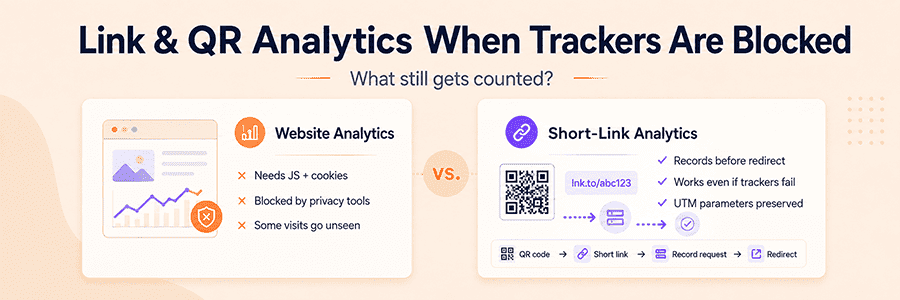
So you pushed out a campaign, stuck a QR code on a poster, dropped a link into a chat - and the numbers in your dashboard came back looking a bit sad. Don't jump straight to "nobody cared." A blocked tag is one possible cause, alongside redirect errors, consent choices, slow loading, and campaign parameters that went missing.
Where visits go to disappear
Most analytics tools (yes, GA4 included) work the same way: a script loads on the page, the script sets a cookie or writes something to storage, the cookie ties the visit to a session. If anything along that chain breaks, the visit just doesn't exist as far as the dashboard is concerned.
Plenty of things can break it:
- browsers that block trackers by default
- ad blockers and privacy extensions
- corporate firewalls and DNS filters
- antivirus doing a bit too much
- JavaScript turned off
- people saying "no" to the consent banner
- in-app browsers that quietly do whatever they want
That list is a troubleshooting checklist, not proof that blocking caused a particular campaign's numbers to fall.
What changes with a short link
A short link sits in the middle of the click. If the request reaches the short-link server and is accepted by its reporting system, it can be recorded before the visitor is redirected. This measurement does not depend on JavaScript or cookies on the destination page, but DNS filters, corporate controls, network failures, and server-side filtering can still prevent a request from appearing in the report.
Worth being clear about what this actually counts: clicks and scans, not confirmed humans. One person clicking three times shows up as three. So does a bot checking the link. It's a useful complement to your site analytics, not a swap-in replacement.
Making QR codes measurable
A QR code that contains a link is a machine-readable picture of that URL. The image itself does not report a scan.
For design and print checks, see how QR codes work and how to test them.
Put a short link behind it, though, and you suddenly have a flow you can actually measure:
QR code -> short link -> request logged -> redirect -> landing page
This is where it really earns its keep - anywhere the code lives outside a browser tab. Packaging. Flyers. Posters. Menus. Event signage. Tickets. Slide decks. Product inserts. Once that stuff is printed, you can't change it, but the URL behind the code can still be tracked, and even swapped out later if the campaign needs to go somewhere different.
Two layers, two numbers
In real life you usually end up with two counts going on at once. The short-link service logs the request. The site analytics (when it's allowed to run) logs what happens on the page after that.
Those numbers often differ because they measure different units at different points. A stable difference may be expected; a sudden or large change still needs investigation. Compare the same date range and campaign, open a test short link, inspect the final URL, confirm that the page and analytics tag load, then check the filters applied to redirect statistics.
Bots and link previews
Left on their own, redirect logs would be full of noise - security scanners, monitoring services, and especially link previews from social networks and messengers. The moment you paste a link into Slack, Telegram, WhatsApp, or post it on X, those services fetch the URL to generate a preview card. That fetch is a real request, but nobody is actually looking at your page yet.
MeoVC applies filters to keep recognized automated requests out of the dashboard statistics. Raw server requests and the filtered report are therefore different counts. Treat the displayed number as filtered request activity, not as a count of confirmed people.
There's a catch, though. Any bot that bothers to send a normal-looking User-Agent and behaves like a regular browser is hard to tell apart from a human. The same is true for residential proxy networks and headless browsers that mimic a real device. Filtering is heuristic, not perfect - it's good at cutting the obvious noise, less reliable against something deliberately trying to blend in. Worth keeping in mind when you see a number that looks a little too clean or a little too high.
UTM still works
You don't have to give up campaign tagging to use a short link. The destination URL behind it can carry a full set of UTM parameters. The link you print or share stays short, the QR code stays scannable, and any analytics tool that reads UTM still credits the campaign. The redirect gets counted by the short-link service even if the destination script never gets a chance to run.
For example:
https://example.com/product?utm_source=poster&utm_medium=qr&utm_campaign=summer_sale
UTM isn't a Google-only thing either - it's a shared convention. Most platforms know what to do with it.
MeoVC Relay
If you need more than just the standard UTM tags, MeoVC has a feature called Relay. It forwards query parameters from the short link to the destination, and you get to pick how much goes through.
UTM and ref parameters only - the current interface forwards utm_source, utm_medium, utm_campaign, utm_content, utm_term, plus the custom ref parameter. ref is not a standard UTM parameter.
Pass all parameters - every parameter on the short link gets copied over, same keys, same values. Handy for affiliate IDs, promo codes, internal campaign IDs, pre-filled form values, anything a downstream integration needs.
Quick reminder while we're here: don't put anything sensitive in a URL. Passwords, tokens, personal data - all of that can end up in browser history, server logs, referrer headers. URLs are public. Treat them that way.
What it can't do
Recording a redirect doesn't need a cookie on the destination page, which keeps things lighter from a privacy angle. It doesn't get you out of privacy obligations, though. What you collect, how long you keep it, what you link it to - that still matters legally.
It also won't show you everything. Without a real consent flow or an identity layer, you're not going to reliably recognize the same person across visits or devices, you won't see the full path from first click to final purchase, and you won't always be able to tell a human from a bot. It's a useful signal. Just don't mistake it for the full picture.
How this plays out
Say a company prints a QR code on a product brochure. Behind the code sits a MeoVC short link. Someone scans it, MeoVC logs the request and bounces them to a campaign page with UTM parameters attached. If the page's own analytics runs fine, great - you get time on page, clicks, conversions on top. If a browser or extension blocks the script, that part is lost. But the original scan is still sitting in MeoVC's redirect statistics, completely independent of what the destination page did or didn't do.
Use the redirect report to diagnose delivery to the short link, then use site analytics and business data to evaluate what happened after the redirect.