Loden Falk
For a business card, you may need a QR code with a logo. For a café, a code that connects guests to Wi-Fi. For a flyer, just a link to a website. All of those can be made for free. The difference between services shows up later: one gives you only an image, another helps you prepare it for print, and a third asks you to create an account first.
Our first recommendation in this list of free QR code generators is the MeoVC QR Code Generator. It supports several data types, gives you detailed design controls, lets you copy the finished image to the clipboard, and exports it in five formats without registration. With a free MeoVC account, you can also create up to 30 dynamic QR codes with scan tracking. Below, we look at what this and the other tools offer—and where their free plans stop.
Try the free QR code generator
This list was prepared by the MeoVC team. We compare free features for everyday use; the order reflects our editorial view. The third-party terms and MeoVC details were checked on September 10, 2026.
Free QR code generators: a quick comparison
| No. | Service | Best for | Keep in mind |
|---|---|---|---|
| 1 | MeoVC | Detailed styling, five export formats, copying, scan-readability checks, and up to 30 dynamic codes | The scan estimate is calculated; dynamic features require a free account |
| 2 | Adobe Express | A website link that will be designed further in Adobe | The generator accepts URLs; there is no dedicated Wi-Fi mode |
| 3 | Canva | A QR code placed in a business card, menu, or poster | Working with a design requires sign-in; analytics depend on the plan |
| 4 | QRCode Monkey | A static code with a logo and a vector file | PDF and EPS do not preserve every design option |
| 5 | goQR.me | A quick code for a link, text, or contact | Basic styling, without a detailed visual editor |
| 6 | QR Code Generator by Bitly | A standard static QR code | A logo is a PRO feature; unique scans are an estimate |
| 7 | The QR Code Generator | Trying a dynamic QR code | Only two free dynamic codes; branding and ads appear when the code is scanned |
| 8 | SimpleQR | A simple code for a URL, text, or Wi-Fi | PNG and SVG only, with no dynamic codes or analytics |
| 9 | TEC-IT | Codes with error-correction and margin settings | Some resolution settings are available only to subscribers |
| 10 | QRStuff | A ready-made static code in PNG | Vector export and dynamic features are paid options |
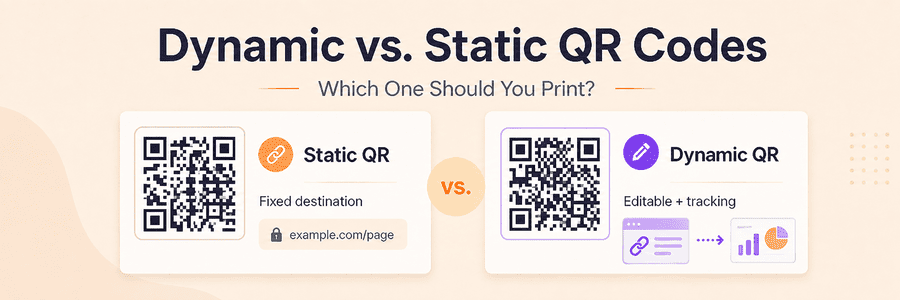
A free static QR code stores the entered data in the image itself. If it contains a direct link to your website, opening it does not require an intermediary address from the generator. A dynamic code uses a redirect: you can change the final destination, but the code depends on the service and the terms of the selected plan. Check this difference before sending a print run to production.
1. MeoVC QR Code Generator — maximum customization, exports, and analytics
MeoVC QR Code Generator lets you create a QR code for free without registration, customize its appearance in detail, and download it as a separate file. You can start with a regular link and use the same tool later for contact details, Wi-Fi, or an event.
For example, a café counter can use a Wi-Fi QR code: enter the network name, security type, and password. For a business card, create a QR code with contact details so nobody has to copy the phone number by hand. There are also modes for text, email, phone calls, SMS, WhatsApp, and other tasks.
MeoVC's main advantage in this comparison is the broadest range of detailed appearance settings combined with checking tools. You can upload a logo, adjust the space around it, choose separate shapes for the modules, corner frames, and corner centers, and use a solid color or a linear or radial gradient. Transparent backgrounds are supported as well. The generator warns you when the contrast is too weak. Next to the result, it shows a calculated estimate of the chance that modern and older scanners will read the code, together with a recommended minimum size for screens and for printing at 300 DPI.
The finished code can be downloaded as PNG, JPEG, WebP, SVG, or PDF. If you do not need a separate file, the copy button places the image directly on the clipboard, ready to paste into a document, presentation, or graphics editor. That removes a few steps and is especially useful when preparing a layout quickly.
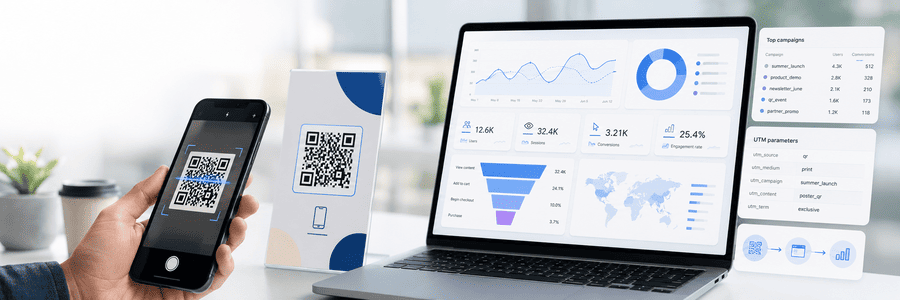
After free registration, MeoVC lets you create up to 30 dynamic QR codes with scan tracking. A dynamic QR code lets you change the destination after printing while keeping the QR image unchanged. The analytics show the number and time of scans, country, region, browser, and device.
You can save QR templates in your account and apply a prepared appearance to new codes. This is useful when a company needs a series of codes in one style instead of choosing the logo, shapes, and colors again each time.
Advantages:
- create and download a separate QR code without an account;
- different content types, including Wi-Fi and contact details;
- logo and logo margin, gradients, separate module and corner-marker settings, and a transparent background;
- export to PNG, JPEG, WebP, SVG, and PDF;
- copy the image directly to the clipboard;
- weak-contrast warning, estimated scan probability, and recommended minimum size;
- up to 30 free dynamic QR codes, saved templates, and scan analytics after registration.
There are limitations. Transparency is supported in PNG and SVG; when exporting to JPEG, WebP, or PDF, the background will be white. Dynamic mode works through a managed short link and is available for supported links and actions; data written directly into a static code cannot be changed. The calculated scan estimate does not guarantee that the code will work on every phone, so test the finished file, especially after adding a logo.
We rank MeoVC first for its combination of the broadest range of detailed appearance settings in this comparison, five export formats, clipboard copying, scan-probability estimate, and recommended minimum print size. Registration adds up to 30 free dynamic QR codes and scan analytics.
Try free MeoVC QR code generator

2. Adobe Express — a QR code for a link
Adobe Express QR Code Generator accepts a URL, lets you customize the style and color, and then downloads the code as PNG, JPEG, or PDF. You can use the result in an Adobe Express project. Adobe also describes adding a logo through its editor.
Pros: a simple workflow for a link, PDF export, and the option to continue working on a flyer or business card in Adobe.
Cons: the generator supports URLs. Direct Wi-Fi connection or saving a contact requires another tool; a link to a contact page is not a substitute for a vCard entry. You also cannot change the address after issuing a static code.
Adobe Express makes sense when the layout is already being created in its editor. As a standalone QR-code generator, it offers noticeably fewer data types, settings, and checking tools than MeoVC.
3. Canva — free after registration, directly inside the layout
Canva QR Code Generator is useful for creating a code as part of a design. After registering or signing in, you can open a layout, add a QR code containing a link, and place a heading, instructions, or a company logo next to it.
If the menu has already been designed in Canva, the code can be added to the same layout.
Advantages: ready-made templates, working with the code inside the composition, and collaborative design editing.
Limitations: this workflow requires an account. If you only need a separate QR file, working through a layout adds steps. A free QR generator also does not make every design element free: selected assets may require payment. The official page lists QR-code analytics for Canva Business and Enterprise.
Canva works primarily as an editor for a finished layout. Creating a separate QR code, Wi-Fi code, or contact code takes more steps than in MeoVC.
4. QRCode Monkey: an alternative for a code with a logo
QRCode Monkey creates free static QR codes with colors, logos, and modified element shapes. It offers vector export, and commercial use of the generated codes is allowed.
Pros: flexible appearance controls and SVG for layout work.
Cons: PDF and EPS have limits: they support classic QR codes, but not every design variation, logo, or gradient. For a styled result, the service itself recommends SVG. Scan statistics and editable destinations belong to a separate paid professional product.
QRCode Monkey can style a static code, but some of that design is lost when exporting to PDF or EPS. MeoVC preserves the selected appearance in all five formats, shows contrast, scanning, and size guidance, and provides up to 30 free dynamic QR codes after registration.
5. goQR.me: enter the data and download
At goQR.me, the image is generated as you enter the details. You can encode a link, text, contact, or SMS, choose colors and margins, and download a raster or vector file. Commercial use is free.
Pros: a short path from form to image, several data types, plus SVG and EPS for print.
Cons: the main form offers basic visual controls. If you need gradients, different module shapes, or separate corner markers, a detailed visual editor is easier to use.
goQR.me is enough when you need an ordinary, high-contrast code and appearance is not a priority.
6. QR Code Generator by Bitly: basic codes for free
QR Code Generator offers free static codes for URLs, text, vCards, email, SMS, and Wi-Fi. Under the service terms, they do not expire, but their encoded content cannot be changed and scans cannot be tracked.
Advantage: the main use cases are gathered in one tool.
Limitation: uploading your own logo is a PRO feature. The site offers a 14-day trial, so trial features should not be treated as permanently free.
Bitly also says it counts Unique scans. Its own explanation describes this as an estimate based on unique devices or browsers, not an exact number of people. Identifying a repeat scan means recognizing a device or browser again, and Bitly does not explain the method on the product page.
When cookies or similar identifiers are used, the EU usually requires consent. In the United States, the rules vary by state and context; for example, the CCPA provides for notice and an opt-out right in covered cases. Treat Unique scans as an approximate metric, not an exact visitor count.
The service works for a simple static code, but a logo, complete analytics, and other useful features quickly move you beyond the free scenario.
7. The QR Code Generator: two free dynamic QR codes
The QR Code Generator, or TQRCG, lets you create only two dynamic QR codes for free. MeoVC's free allowance is 30 codes.
Pro: you can see whether a dynamic QR code suits your use case.
Cons: the limit is two dynamic codes and free analytics are retained for 14 days. The free plan cannot remove the watermark, and scanning a dynamic code shows advertising. Free download is PNG; SVG requires registration and a paid plan. These limits are listed on the TQRCG pricing page and in its official help article.
Two codes are enough only for a small one-off task. For several menus, packages, promotional materials, or client projects, you will reach the limit quickly.
8. SimpleQR: a simple static code without registration
SimpleQR creates static QR codes directly in your browser. It supports three simple options: a URL, plain text, and Wi-Fi access. You can choose a color, dot and corner shapes, and add a logo.
Pro: no registration is required, and data is not sent to the service's server.
Cons: only PNG and SVG are available. There is no PDF, JPEG, or WebP, no dynamic QR codes, scan tracking, readability estimate, or print-size recommendation. The selection of data types is much smaller than in MeoVC.
SimpleQR fits when you need one basic static code and nothing else.
9. TEC-IT: for technical QR-code settings
TEC-IT's generator supports links, contacts, phone numbers, Wi-Fi, and other data. Its settings include error-correction level, code page, quiet zone, and colors.
Pros: control over technical settings and multiple content types. TEC-IT says it does not track scans.
Cons: the interface expects you to understand its terms. Resolution settings up to 600 DPI are marked as subscriber features, so they should not be counted as fully free functionality.
Consider TEC-IT only when you have specific technical requirements. For branded styling and print preparation, MeoVC is easier to use and more capable.
10. QRStuff: a quick static code in PNG
QRStuff lets you create static QR codes without registration. According to its terms, those codes have no expiry date or scan limit. An account adds code saving, while paid plans add dynamic editing and analytics.
Pros: basic creation without signing in, several use cases, and free static codes.
Cons: its plan comparison labels free export as PNG only. SVG and other extra formats require paid features. If a printer asks for a vector file, MeoVC's free SVG is more practical.
QRStuff is enough for an image you need to send or use in digital material. Decide on the required print format before you build the layout.
What to check before printing a QR code
Even a good generator cannot correct a wrong address. Before ordering business cards or stickers:
- Scan the downloaded file and check the result: the page, contact, or network connection.
- Make sure you used a permanent address. You can update a menu on your own website while keeping its URL.
- Preserve the quiet zone around the code. Text and decorative elements should not touch its modules.
- Print a sample at the required size. Test it on several phones and from the expected distance.
- Repeat the test after changing the logo, colors, or scale in the layout.
SVG is usually the convenient choice for design work because it scales without blurring the modules. PNG is fine if the resolution is sufficient at the final size. Use MeoVC's 300-DPI recommendation as a starting point; material, lighting, and distance also affect scanning.